Sale!

Epson L3100 Resetter Download (Email Delivery)
Original price was: ₹299.00.₹100.00Current price is: ₹100.00.
Anydesk Support: WhatsApp Message
Description
How to reset Epson L3100 Model (Service required | red Lights one By One Blinking)
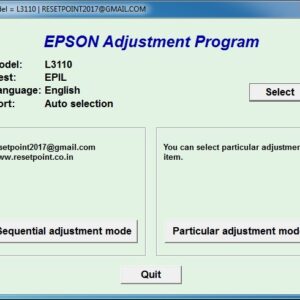
- Model Select & Selected Default: L3100,
- Select USB Port (Exp: USB00L3100)
- Then Click On > Particular Adjustment Mode
- Nest Step Maintenance > Waste Ink Pad Counter > ok
- Main Pad Counter > Check (100%) Point
- Select Main Pad Counter > Initialize
- Click the Ok Button. (Some Times Not Responding)
- The printer turns off And Turn on Try Again.
- Last Step printer Power off And Power-On (Restart Printer)
- Your Printer Reset is done.
Product Available & Anydesk Support 10 Am to 5 Pm
- Epson L3100 Resetter Download & Reset Ink Pad.
- Reset Waste Ink Pad Counter 100% Working.
- Use Software Multi PC & L3100 Printers.
- Instant download Button & Password Button.
- Epson L3100 Lifetime working Virus-free.
- Epson adjustment program download
- Whatsapp Support – (91)
How to reset Epson L3100 Printer Watch video
37 reviews for Epson L3100 Resetter Download (Email Delivery)
Related products
-
Sale!
Epson L3116 Resetter Download (Email Delivery)
Original price was: ₹299.00.₹100.00Current price is: ₹100.00. Read more -
Sale!

Epson L1800 Resetter Download (Email Delivery)
Original price was: ₹299.00.₹100.00Current price is: ₹100.00. Read more -
Sale!

Epson L3118 Resetter Download (Email Delivery)
Original price was: ₹299.00.₹100.00Current price is: ₹100.00. Read more -
Sale!

Epson L3115 Resetter Download (Email Delivery)
Original price was: ₹299.00.₹100.00Current price is: ₹100.00. Read more
vicky –
Thank you so much for this article po. It really help! Problem resolve.
sunray (verified owner) –
Thank you so much..Such a great help
nawab –
God bless you po. This article helped me so much, since I am not techie or knowledgeable with equipments, this article was my savior. Thank you very much.
umadev –
Thank you, it’s working
kamal –
THANK YOU SO MUCH