Sale!

Epson L3210 Resetter Download (L3200, L3250, L3260 Series) Instant Download
Original price was: ₹1,000.00.₹0.00Current price is: ₹0.00.
Ask discount code
Watch the video HOW TO DOWNLOAD
Description
Epson L3210 Resetter Download Working with Models L3200 L3216 L3250 L3251 L3252 L3255 L3256 L3260 L5290. Latest Version of 2026
How to download Epson L3210 Resetter
How to reset Epson L3210 Model and L3200 L3216 L3250 L3251 L3252 L3255 L3256 L3260 L5290
(Service required | Red Lights | All Lights Blinking)
- Model Select & Selected Default: L3210,
- Select USB Port (Exp: USB00L3210)
- Then Click On > Particular Adjustment Mode
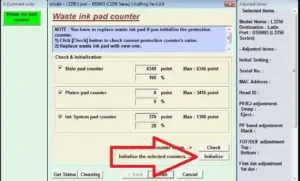
- Nest Step Maintenance > Waste Ink Pad Counter > ok
- Main Pad Counter > Check (100%) Point
- Select Main Pad Counter > Initialize
- Click the Ok Button. (Some Times Not Responding)
- The printer turns off And Turn on Try Again.
- Last Step printer Power off And Power-On (Restart Printer)
- Your Printer Reset is done.
Anydesk Support 10 AM to 5 PM (If you don’t receive the file email, send me a message on WhatsApp)
- Epson L3210 L3216, L3250, L3251, L3252, L3256 L5290.
- Epson L3210 Resetter Download & Reset Ink Pad.
- Reset Waste Ink Pad Counter 100% Working.
- Use Software Multi PC & L3210 Printers.
- Instant download Button & Password Button.
- Epson L3210 Lifetime working Virus-free.
- Epson adjustment program download
Also Download Windows activator
258 reviews for Epson L3210 Resetter Download (L3200, L3250, L3260 Series) Instant Download
Related products
-
Sale!

Epson L5290 Adjustment Program Download Latest Version 2026
Original price was: ₹500.00.₹0.00Current price is: ₹0.00. Add to cart -
Sale!

Epson L805 Resetter download (Email Delivery)
Original price was: ₹500.00.₹0.00Current price is: ₹0.00. Add to cart -
Sale!

Epson L3115 Resetter Download (Email Delivery)
Original price was: ₹500.00.₹0.00Current price is: ₹0.00. Add to cart -
Sale!

Epson L380 Resetter Adjustment Program (L380 L385 L485) Instant Download 2026
Original price was: ₹500.00.₹0.00Current price is: ₹0.00. Add to cart
Pravin –
Thank you so much, I am grateful
Guest (verified owner) –
Thank you Brother! its works 100%
kirtikumar k patel –
Thanks, Printer Reset Successful
gandhi –
Sir you have solved my printer problem. Thank you very much
ANSHU JI –
I just fixed my printer L3210 with the help of this. Big thanks, Sir!